The V2 Message Explainer takes an HL7® Version 2 message and tells you what every segment, field and component means. It also lists problems, each with a fix.
It is a reading aid, not a conformance test. Use synthetic or de-identified messages.
Steps
- Open V2 Message Explainer from the menu at the top of the site.
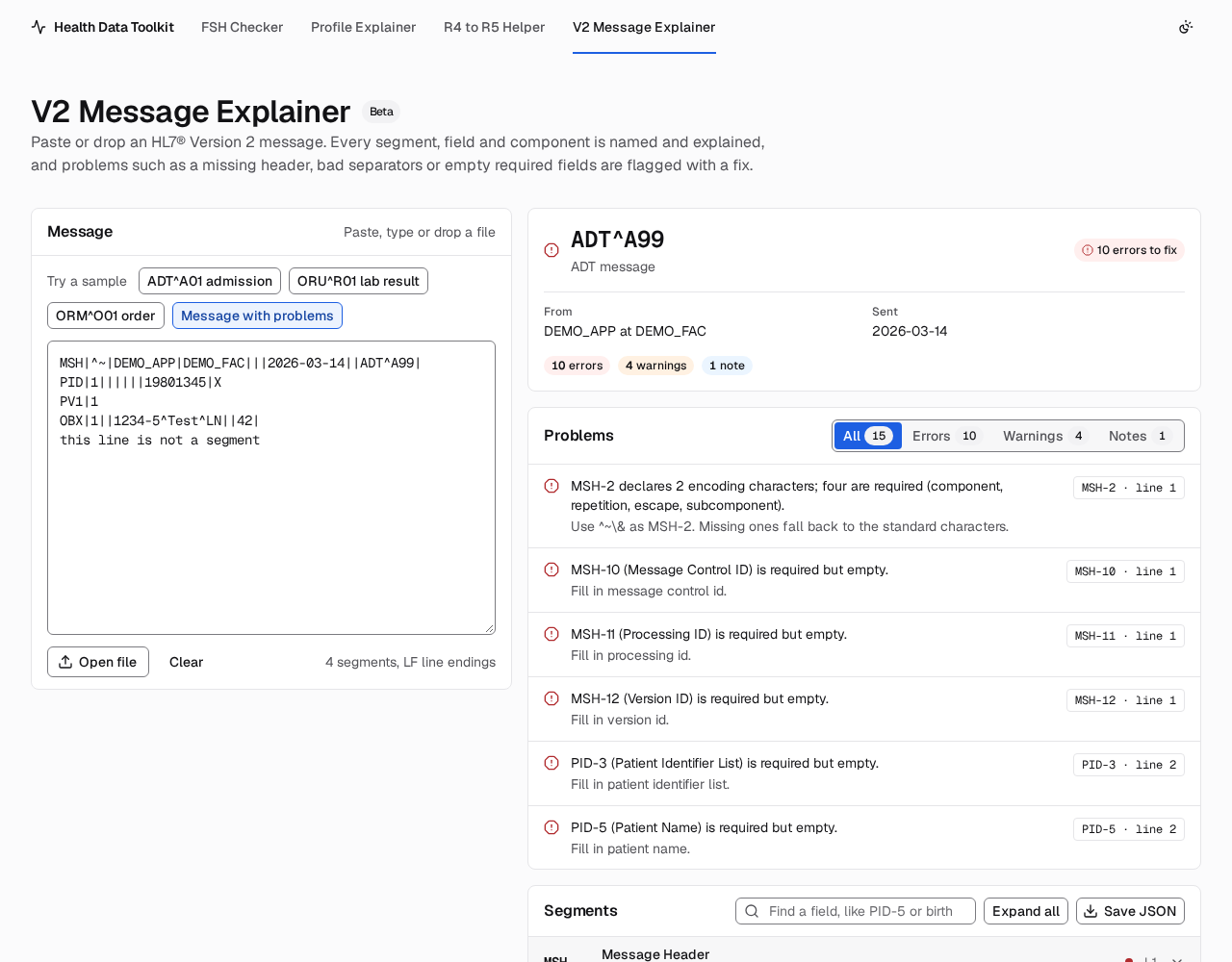
- Paste a message into the Message box, drop a file onto it, press Open file, or pick a sample. It is explained as you type. There is no button to press.
- Read the summary at the top right: the message type, who sent it, when, and how many problems were found.
- Under Problems, each problem says what is wrong and how to fix it. Press the location on the right (for example
PID-3 · line 2) to jump to that field. - Under Segments, open a segment to see each field with its name, data type, value and meaning. Components and repetitions are listed under their field.
- Use Find a field to search by position (
PID-5) or by name (birth). Save JSON downloads the explained message as a file, made in your browser.
A link like /hl7v2/#sample=oru opens a sample directly.
What it checks
- A missing or misplaced MSH segment, and bad separator or encoding characters in MSH-1 and MSH-2.
- Segment terminators: Version 2 uses a carriage return (CR). This check runs on opened or dropped files and samples, because the browser turns pasted line breaks into LF.
- Required fields that are empty.
- Codes that are not in the HL7 table for the field, where the table lists values.
- Dates and times that are not valid.
- Lines that do not look like segments, and lines that start with spaces.
Limitations
- Definitions are for version 2.5.1 only. Messages that say another version in MSH-12 are explained with 2.5.1 names, and a note says so.
- It checks segments and fields, not the full message grammar (segment groups and order), and not conformance profiles or local implementation guides.
- It does not check field lengths. It only checks codes for tables that list values. User-defined (IS) tables are reported as local codes.
- Plain-English notes cover the common fields of MSH, EVN, PID, NK1, PV1, ORC, OBR, OBX, AL1 and DG1. Other fields show the standard name only.
- Z segments are shown but cannot be named, because they are site specific.
- It shows up to 400 segments and reads the first 5 MB of a file.
Privacy
This page has a stricter policy than the rest of the site. Its Content Security Policy sets connect-src 'none', so the page cannot send what you paste anywhere, and it turns on Trusted Types. It still loads its own script and style files. Messages are never saved to browser storage. See Privacy and how it works.
Data source
Definitions derived from HL7 v2.5.1, © HL7 International.
The field names, data types, optionality, repetition and table values were obtained through hl7-dictionary 1.0.1, refreshed 2026-10-25. The plain-English notes are written by this project.
HL7 attribution
Definitions derived from HL7 v2.5.1, © HL7 International.
HL7, FHIR and the FHIR [FLAME DESIGN] are the registered trademarks of Health Level Seven International and their use does not constitute endorsement by HL7.